Article content

Denis Kryukov
5 min read
GeeLark can become even more powerful thanks to Infatica's global proxy infrastructure designed for stable, location-aware connectivity. In this guide, we will walk through how to integrate Infatica proxies with GeeLark, explain the benefits of using them together, and highlight practical use cases where this combination supports efficient and reliable workflows.
What is GeeLark?
GeeLark is a cloud-based platform that enables users to remotely run multiple real Android devices and manage distinct digital environments from a single dashboard. Unlike traditional emulators or browsers, GeeLark operates actual Android phones hosted in the cloud, giving each device its own unique parameters — such as device identifiers, operating system version, and network settings — which helps make each session appear like a genuine mobile user.
At its core, GeeLark provides a suite of tools focused on efficient multi-account management and workflow automation across social, e-commerce, and other online platforms. Its key capabilities include:
- Cloud Phones: Run native applications and browsers on remote cloud devices that behave like real phones, accessible from anywhere.
- Isolated Profiles: Each cloud phone operates as an independent identity with its own device fingerprint and settings, keeping different accounts compartmentalized.
- Proxy Support: GeeLark supports integration with external proxies, allowing custom network routing per device.
- Automation Tools: Built-in automation (including RPA and synchronizer features) helps streamline repetitive tasks across apps and devices.
- Team Collaboration: Features like role permissions and activity tracking facilitate coordinated workflows for teams.
Why use Infatica with GeeLark?
- 25M Proxy IPs: Access a large, diverse IP pool that supports stable scaling across multiple devices and workflows.
- Global Targeting with Precision: Reach IPs in 195 countries with granular targeting by country, city, ZIP code, or ASN for location-specific testing and operations.
- Fast Response Times: An average 0.4-second response time minimizes latency in high-volume, performance-sensitive tasks.
- 99.9% Network Uptime: Enterprise-grade infrastructure delivers consistent, reliable proxy availability around the clock, even at scale.
- Ethically-Sourced IPs: All IPs are transparently sourced and ISO-certified, ensuring compliance-focused and responsible usage.
- API & Integration-Ready: Manage proxy sessions programmatically through a robust API designed for seamless integration with automation tools and third-party platforms.
Popular use cases
Social media marketing: Infatica proxies combined with GeeLark cloud phones allow marketing teams to manage and test multiple social media accounts across isolated mobile environments, each with its own device profile and network settings. This setup supports content publishing, account organization, and performance analysis across regions while maintaining consistent, stable connectivity.
Ecommerce and dropshipping: For ecommerce and dropshipping workflows, the Infatica+GeeLark combination enables teams to operate multiple storefronts, seller accounts, or buyer profiles from distinct mobile devices. By assigning dedicated proxy locations to individual cloud phones, users can monitor listings, manage orders, and test regional storefront behavior under realistic mobile conditions.
Ad verification: Advertisers and agencies can use GeeLark cloud phones with Infatica’s geo-targeted proxies to view and validate how ads are displayed in different locations. This helps confirm correct ad placement, creatives, and localization across markets, ensuring campaigns run as intended and comply with platform requirements.
Market research: Market research teams can collect location-specific insights by accessing websites, apps, and localized content through cloud phones configured with precise proxy targeting. This approach supports accurate analysis of pricing, availability, language, and regional user experience without relying on simulated or shared environments.
App tests: For mobile app testing, GeeLark provides real mobile and desktop devices in the cloud, while Infatica proxies enable controlled network conditions from different regions. Together, they allow QA and product teams to test app behavior, performance, and connectivity across locations, devices, and network setups in a scalable and repeatable way.
Step-by-Step Setup Guide
Integrating Infatica proxies into GeeLark is easy and takes just three simple steps:
1. Sign up for GeeLark
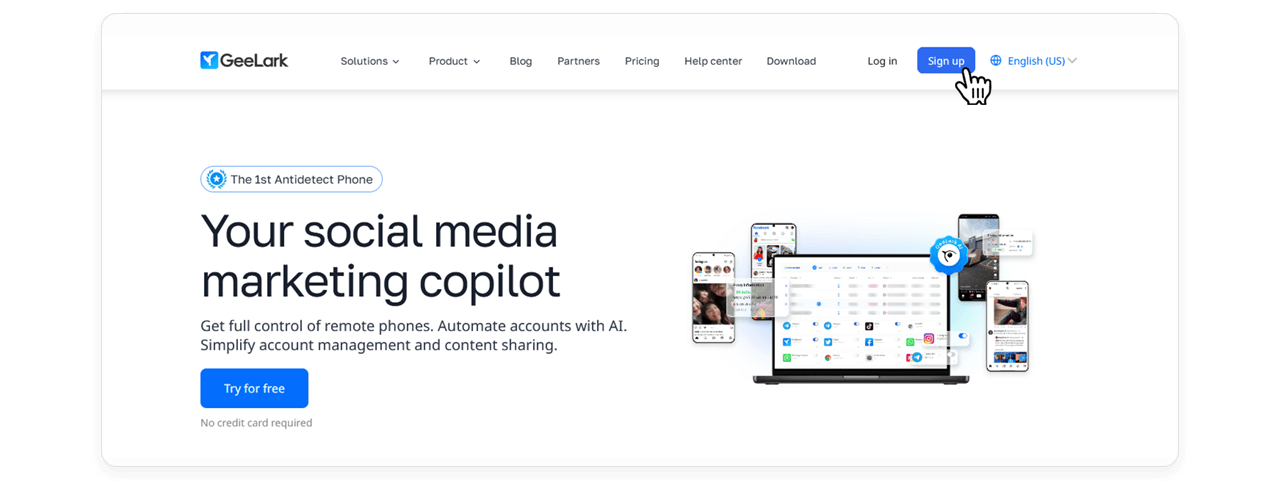
Visit the official GeeLark website and click the Sign Up button to create your account. Once registered, download GeeLark, install it, and launch the application.
2. Get your Infatica proxy details
Log in to your Infatica account, go to My Proxy Products, and click your proxy package.
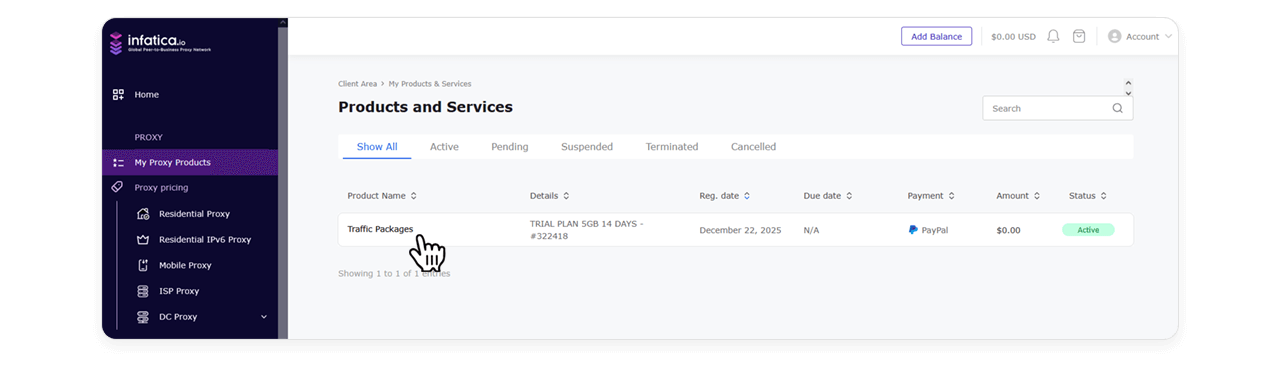
Scroll down to the Generate Proxy List section. Here, you can optionally adjust proxy parameters such as:
- Location preset: World Mix, Custom, or region-specific (e.g. Northern America)
- Rotation period: Sticky, For each request, or time-based
- Other available settings
Click Generate to create the proxy list.
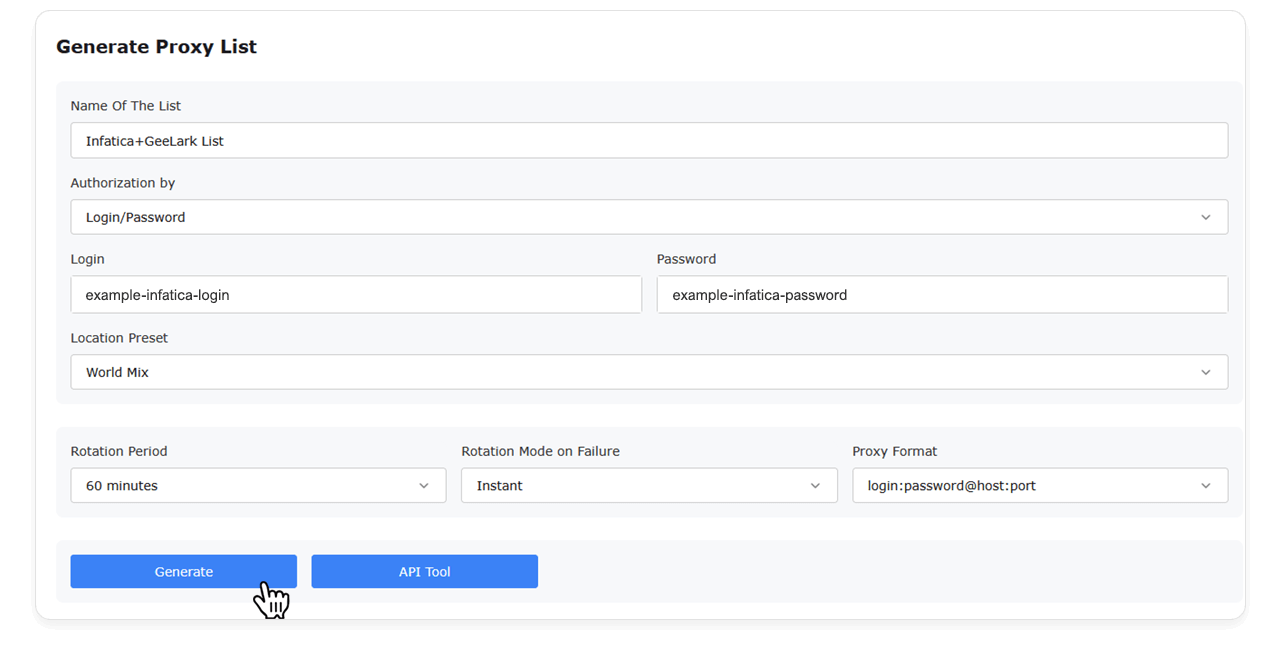
Next, scroll up to the Proxy List section and click the name of the newly generated list. A new browser tab will open with your proxy credentials in the following format:
username:password@pool.infatica.io:10000
username:password@pool.infatica.io:10001
username:password@pool.infatica.io:10002
username:password@pool.infatica.io:10003
username:password@pool.infatica.io:10004
Copy any proxy address from the list.
3. Add the proxy to GeeLark
Return to GeeLark and click New profile in the top-right corner.

In the Proxy settings section, open the Type dropdown and select SOCKS5 or HTTPS.
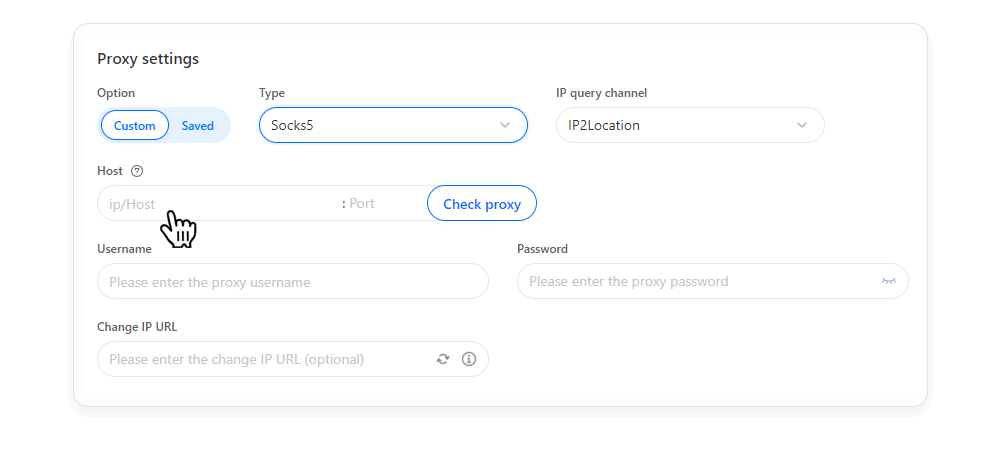
Paste your Infatica proxy address (for example, SW8Tmbfwl0rdGrgZtW7i:Oe1U4Vyw@pool.infatica.io:10000) into the Host field. GeeLark will automatically populate the Username and Password fields. Click Check proxy to verify that the connection is working correctly.
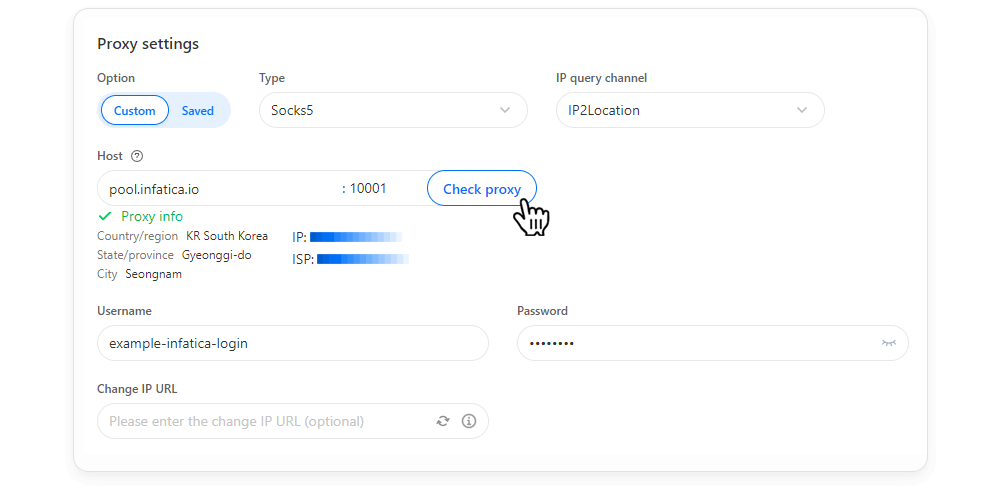
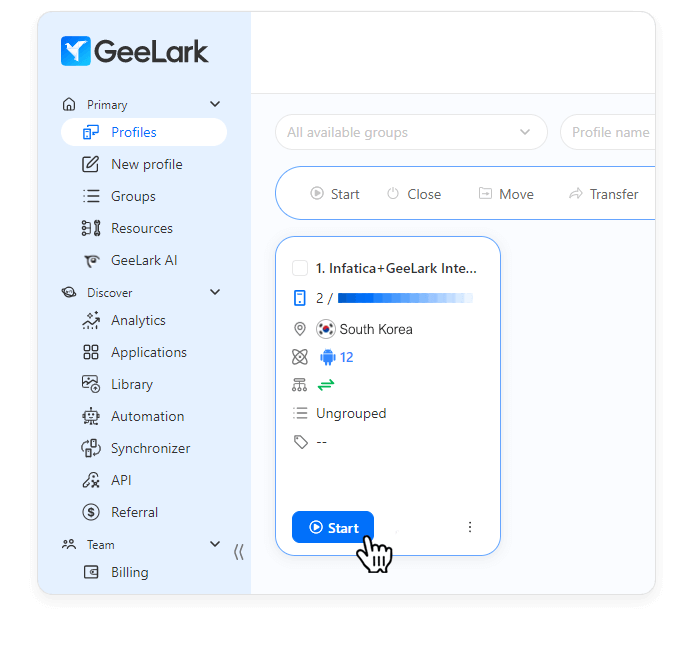
Scroll down and press the Create button. That's it! You can access your new profile from GeeLark's home screen.
Looking for reliable proxies for GeeLark?
Infatica provides globally distributed, ethically sourced proxies that integrate smoothly with GeeLark cloud devices. Explore Infatica solutions today.
Troubleshooting
Ensure the proxy credentials are entered correctly and match the required format. Verify that the selected protocol is supported, the IP is active in your Infatica dashboard, and the proxy is assigned to the correct cloud phone.
If you experience slow connections or instability, switch from the HTTPS protocol to SOCKS5. SOCKS5 typically offers better performance for mobile environments by handling traffic more efficiently and reducing connection overhead.
Confirm that the correct geo-targeting parameters are applied in your Infatica proxy settings. Restart the cloud phone after updating the proxy to ensure the new IP location is fully applied within the GeeLark session.
Yes, GeeLark allows each cloud phone to have its own proxy configuration. Assigning separate Infatica proxies to individual devices helps maintain isolated network environments and improves consistency across multi-device workflows.
Connection drops may occur due to idle timeouts or session limits. To reduce this, keep the cloud phone active, review session duration settings, and ensure your Infatica proxy plan supports long-running or persistent connections.