Article content


Vlad Khrinenko
6 min read
Working with Google data at scale requires more than just sending requests. In this article, we’ll explore how Google detects automated traffic, which common use cases require proxies, and how different proxy types perform when accessing Google Search, Ads, and localized results.
How Google Detects and Blocks Non-Human Traffic
Google processes billions of searches every day, which makes automated access inevitable – and closely monitored. To protect result quality, advertising integrity, and infrastructure stability, Google relies on a layered detection system designed to identify and limit non-human traffic.
IP Reputation and Network Signals
One of Google’s primary detection signals is IP reputation. Requests originating from IP ranges associated with cloud providers or previously abusive behavior are more likely to be flagged. Google also evaluates the autonomous system (ASN) behind the IP, looking for patterns typical of automated traffic rather than real users.
Request Frequency and Traffic Patterns
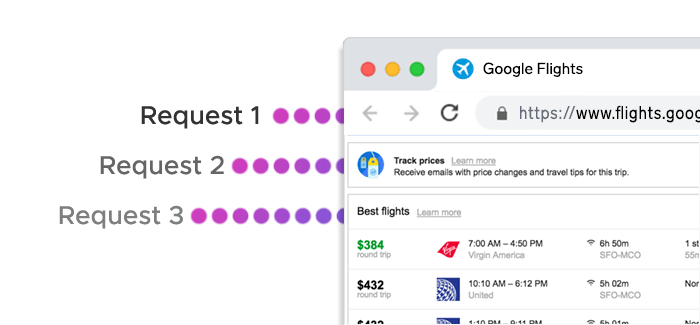
Google closely monitors how often requests are sent from a single IP or subnet. High request rates, uniform intervals, or sudden traffic spikes can quickly trigger rate limits or temporary blocks. Even with proxies in place, unrealistic traffic patterns often lead to CAPTCHAs or HTTP errors if request pacing is not properly managed.
Geolocation Consistency
Google’s results are highly location-dependent. When an IP’s geolocation does not align with the expected user context – such as requesting local search results from an unrelated country – it raises suspicion. Accurate geo-targeting and regional consistency play a major role in accessing localized SERPs reliably.
Browser and Device Fingerprinting
Beyond IP-based checks, Google analyzes browser headers, device characteristics, and behavioral signals. Repetitive or incomplete headers, mismatched user agents, or missing browser features can make traffic stand out as automated.
CAPTCHA and Soft Blocking Mechanisms
Instead of outright blocking traffic, Google often applies progressive restrictions: CAPTCHA challenges, reduced result depth, or temporary IP throttling.
Key Google Use Cases That Require Proxies
Google is a collection of services – search, ads, maps, and more – each with its own access patterns and protection mechanisms. While occasional queries can be handled without additional infrastructure, scaling Google-related tasks almost always requires proxies.
SERP Monitoring and Rank Tracking
SEO platforms and marketing teams regularly monitor keyword rankings across different locations and devices. Without proxies, these queries quickly hit rate limits or trigger CAPTCHAs. Proxies allow requests to be distributed across multiple IPs and geolocations, making it possible to collect accurate, location-specific SERP data at scale.
Keyword Research at Scale
Large-scale keyword research involves issuing thousands of related queries to analyze search volume, related terms, and competitive difficulty. From Google’s perspective, this looks very different from normal user behavior. Using proxies helps spread this load, reduce detection risk, and maintain consistent access to search results over longer periods.
Local SEO and Geo-Specific Search Results
Google personalizes results heavily based on location. Businesses tracking local rankings – down to country, city, or even neighborhood level – need IPs that genuinely reflect those regions. Proxies with precise geo-targeting enable accurate visibility into how users in different locations see the same queries.
Google Ads Monitoring and Ad Verification
Advertisers and agencies often monitor ad placements, creatives, and competitor activity across regions. Google Ads interfaces are particularly sensitive to repeated access from a single IP. Proxies make it possible to verify ads without skewing impressions, triggering fraud detection, or limiting visibility due to access restrictions.
Brand Monitoring and Competitive Intelligence
Brands track mentions, product listings, and competitor visibility across Google Search and Shopping. These workflows involve frequent, automated checks that can quickly exhaust unauthenticated access limits. By rotating IPs and locations, proxies support continuous monitoring without interruptions.
Data Collection for Analytics and Market Research
Market researchers, data providers, and analytics teams collect Google data to analyze trends, pricing, and demand signals over time. Consistency and scalability are essential here, especially when gathering historical or comparative datasets. Proxies provide the stability needed to run long-term data collection without constant blocks.
Choosing the Right Proxy Type for Google
| Proxy Type | How It Appears to Google | Best Google Use Cases | Key Advantages | Considerations |
|---|---|---|---|---|
| Residential Proxies | Real household IPs | SERP scraping, local SEO, keyword research | High trust level, accurate geo-targeting, low block rates | Slightly lower speed than datacenter proxies |
| Datacenter Proxies (Shared) | Cloud-hosted IPs | High-volume, non-localized SERP checks | Fast, cost-efficient, scalable | Higher detection risk for sensitive queries |
| Datacenter Proxies (Dedicated) | Single-user cloud IPs | Continuous scraping, analytics pipelines | Better reputation control, consistent performance | Less trusted than residential or mobile IPs |
| Static ISP Proxies | Residential IPs with fixed identity | Long-lived Google sessions, Ads monitoring | Combines residential trust with IP stability | Smaller IP pools than rotating residential |
| Mobile Proxies | Mobile carrier IPs (NAT-based) | Google Ads verification, protected SERPs | Very high trust, natural IP rotation | Lower raw throughput |
| Residential IPv6 Proxies | Real-user IPv6 addresses | Large-scale SERP data collection | Massive IP availability, low saturation | IPv6 support varies by tool and setup |
Best Practices for Stable Google Scraping
Using proxies is only part of the equation when working with Google at scale. Even high-quality IPs can be blocked if requests don’t resemble real user behavior.
Control Request Rate and Concurrency
One of the most common causes of blocking is sending too many requests too quickly. Google monitors request frequency per IP, subnet, and session, so aggressive concurrency often leads to throttling.
Gradually increasing request rates and keeping concurrency within realistic limits helps traffic blend in more naturally.
Use Smart IP Rotation
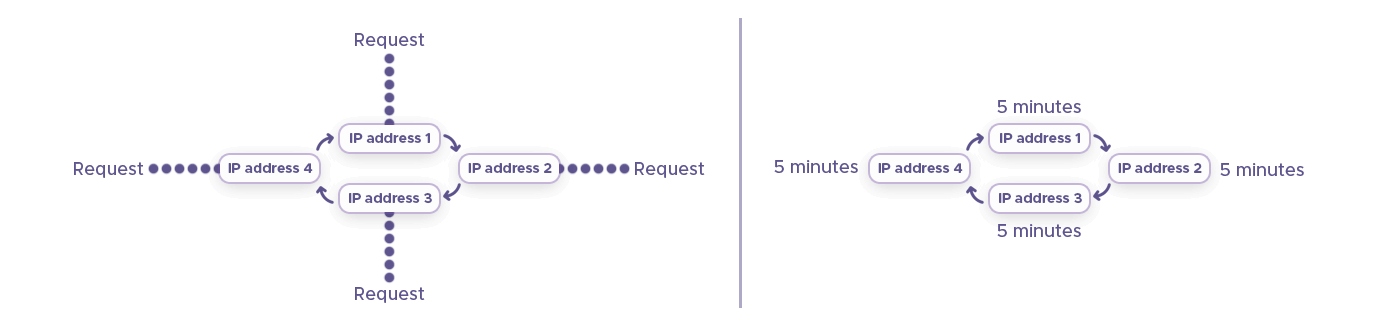
Rotating IPs too frequently can look just as suspicious as not rotating at all. Short-lived tasks may benefit from frequent rotation, while session-based workflows perform better with sticky IPs. Choosing rotation strategies that match the use case improves stability and reduces detection.
Match Geolocation to the Query
For localized searches, the IP location should align with the target region. Requesting city-specific results from unrelated geographies often triggers verification challenges. Accurate country, region, or city targeting is essential for reliable local SERP data.
Maintain Consistent Request Profiles
Headers, user agents, and accepted languages should be consistent within a session. Abrupt changes in browser fingerprints or device characteristics are strong indicators of automation. Using realistic and coherent request profiles helps avoid unnecessary attention.
Handle CAPTCHAs and Retries Gracefully
CAPTCHAs are not always a failure signal – they often indicate that traffic is approaching a threshold. Automatically retrying the same request from the same IP usually makes things worse. Instead, rotating IPs, slowing request rates, or temporarily pausing affected workflows helps restore access.
Monitor and Adapt Over Time
Google’s detection mechanisms evolve continuously. Monitoring response codes, block rates, and CAPTCHA frequency allows teams to spot issues early and adjust their strategy before disruptions escalate. Stable Google scraping is an ongoing process, not a one-time setup.
Ready to Scale Your Google Projects?
Choose the right proxy type for your workflow – whether residential, mobile, static ISP, or datacenter – and start accessing Google data reliably.
Frequently Asked Questions
Google limits automated traffic to protect result quality. Proxies distribute requests across multiple IPs and locations, helping avoid blocks, CAPTCHAs, and throttling while enabling scalable and reliable access to search results and Google Ads data.
Residential or static ISP proxies are ideal for local SEO, as they provide real-user IPs with accurate geolocation. This ensures search results reflect actual local rankings, reducing the risk of Google blocks or misleading data.
Yes, datacenter proxies are suitable for high-volume, non-localized queries, such as bulk SERP scraping or analytics pipelines. Shared datacenter proxies are cost-efficient, while dedicated ones provide consistent performance and reputation control.
Mobile proxies use carrier IPs with high trust scores, making them ideal for Google Ads verification and protected SERPs. They reduce the risk of blocks and naturally rotate IPs, allowing more realistic testing of ad placements across regions.
Residential IPv6 proxies provide a larger, less saturated pool of addresses than IPv4, supporting massive-scale scraping. IPv4 proxies remain widely compatible, but IPv6 is increasingly useful for long-term, high-volume Google data collection.