Article content

Jovana Gojkovic
11 min read
A mobile proxy is a gateway that routes your internet traffic through a real mobile device – a smartphone or tablet connected to a 3G, 4G, or 5G cellular network – so requests appear to come from a mobile carrier IP rather than your own. Because mobile IPs are shared across thousands of real users and rotate naturally, they're much harder for websites to flag or block than residential or datacenter proxies.
This guide covers what mobile proxies are, how they work, the main use cases, how to set one up on iPhone, Android, and desktop, and what to look for when choosing a provider.
What is a mobile proxy?
A mobile proxy is a proxy server that routes your internet traffic through a real mobile device connected to a cellular network, such as 3G, 4G, or 5G. This makes mobile proxies different from datacenter proxies, which use cloud-hosted IPs, and residential proxies, which use home broadband connections. A mobile proxy uses carrier-grade mobile infrastructure, so the traffic appears to come from the same type of connection a real smartphone user would have.
Mobile proxies are often used when businesses need to view or collect web data as it appears to mobile users. For example, a company might use them to check mobile search results, test how ads appear in different regions, monitor mobile-first marketplaces, or manage multiple social media accounts without sending all activity through the same IP address.
Because mobile IPs are used by many real devices and change naturally as users move between networks or reconnect, they are generally harder for websites to classify as automated or suspicious. That said, a mobile proxy is still only infrastructure: the quality of the provider, the way the IPs are sourced, and the way the proxy is used all matter.
How mobile proxies work
When you send a request through a mobile proxy, the request first goes to the proxy provider’s gateway. From there, it is forwarded through a mobile IP assigned by a carrier, and the target website sees that carrier IP instead of your original address.
The key technical detail is how mobile carriers assign IP addresses. Most mobile networks use Carrier-Grade NAT, or CGNAT, which means many users share the same public IP address at the same time. This is common in cellular networks because carriers need to support huge numbers of devices with a limited pool of public IPv4 addresses.
As a result, a single mobile IP can represent traffic from many legitimate users. When a device disconnects, changes towers, switches networks, or reconnects, the carrier may assign a different IP from the same pool. This is why mobile proxy rotation can happen naturally, although providers may also offer manual or session-based rotation settings.
In practice, a mobile proxy setup usually includes several parts:
- Your application or browser sends traffic to the proxy gateway.
- The proxy gateway authenticates the request and applies your settings, such as location or session duration.
- The mobile network routes the request through a carrier IP.
- The destination website receives the request as if it came from a mobile user in that carrier network.
Providers like Infatica also support Country/City/ISP-level targeting. This can be useful for tasks like mobile ad verification, localized SERP tracking, mobile app testing, or checking how content appears to users on specific networks.
Ethical sourcing is an important part of how mobile proxy networks are built. Reliable providers should obtain access to mobile devices through clear user consent, transparent SDK partnerships, or other documented opt-in models. This helps ensure that the network is not only technically effective, but also suitable for legitimate business use.
Mobile vs Residential vs Datacenter vs ISP Proxies
| Proxy type | IP source | Detection difficulty | Speed | Typical pricing model | Best for | Main limitation |
|---|---|---|---|---|---|---|
| Mobile proxies | Real mobile devices connected to 3G, 4G, or 5G carrier networks | Highest | Medium | Usually priced per GB | Social media management, mobile ad verification, mobile app testing, and mobile-first SERP tracking | More expensive than most other proxy types |
| Residential proxies | Real home broadband connections assigned by internet service providers | High | Medium | Usually priced per GB | E-commerce scraping, price monitoring, brand protection, and localized web data collection | Less mobile-specific than carrier IPs |
| Datacenter proxies | Cloud servers or data centers | Low to medium | Highest | Usually priced per IP or traffic package | High-volume scraping of less-protected websites, fast bulk requests, and cost-efficient data collection | Easier for websites to detect and block |
| Static ISP proxies | ISP-issued IPs hosted on dedicated infrastructure | Medium to high | Fast | Usually priced per IP/month | Account management, persistent sessions, sneaker or ticketing workflows, and tasks requiring stable IPs | Smaller location coverage than rotating residential or mobile pools |
What are mobile proxies used for?
Mobile proxies are used when businesses need their traffic to look like it comes from real mobile users on cellular networks. This is especially useful for mobile-first platforms, location-specific testing, and websites that treat mobile traffic differently from desktop traffic.
Social media account management. Agencies and in-house marketing teams often manage multiple brand, regional, or client accounts across social platforms. Mobile proxies help keep each account’s browsing environment consistent by assigning it a separate mobile IP and location.
Ad verification and brand safety. Ad verification teams use mobile proxies to check how ads appear to users in specific countries, cities, or carrier networks. This helps them detect incorrect placements, cloaking, geo-targeting issues, and suspicious mobile ad traffic.
Mobile app QA and ad testing. App developers and QA teams can use mobile proxies to test how apps, in-app ads, landing pages, or onboarding flows behave for users in different regions. This reduces the need to buy physical devices and SIM cards for every test market.
Price monitoring on mobile-first websites. Retailers, travel companies, and price aggregators may need to track prices, availability, or offers that change depending on device type or location. Mobile proxies make it easier to collect data as it appears to real mobile users.
Brand protection and counterfeit detection. Brand protection teams use mobile proxies to monitor social commerce platforms, marketplaces, and mobile-first channels where unauthorized sellers or counterfeit listings may appear. This helps them review region-specific content and collect evidence from the same environment as local mobile users.
SERP and SEO data collection. Search results often vary by device, location, and search context. SEO teams use mobile proxies to track mobile SERPs, local rankings, and mobile-first search features that may differ from desktop results.
How to use mobile proxies: setup guide
Adding a mobile proxy to your device is easy – you can do this in a few quick steps:
How to set up a mobile proxy on iPhone (iOS)
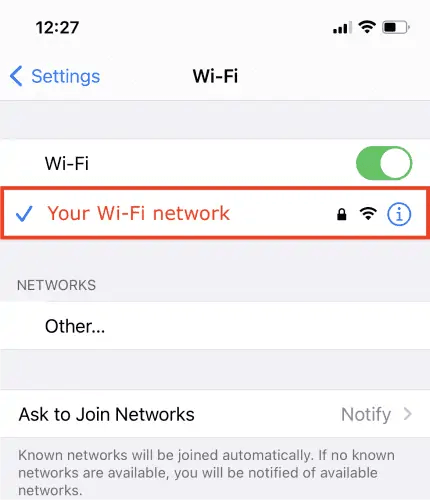
Open your iPhone's Wi-Fi connections list and click your current network to open its settings:
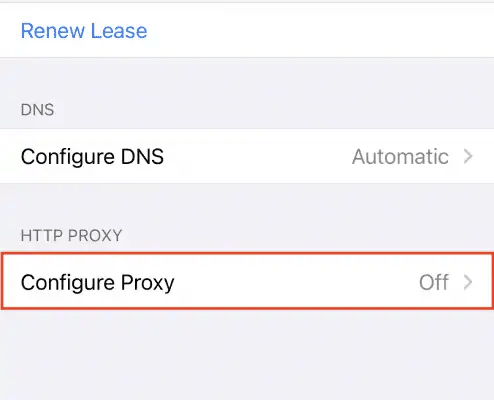
Scroll down to the HTTP PROXYarea and tap Configure Proxy:
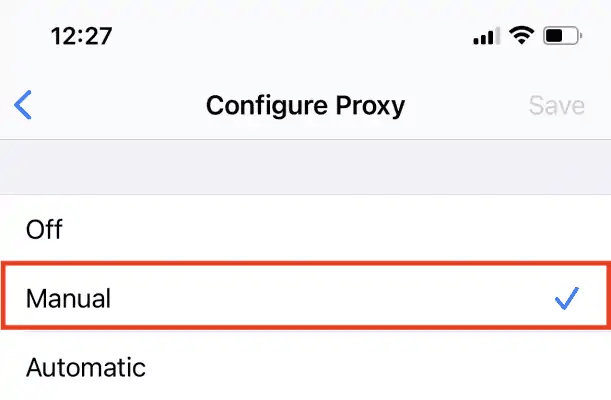
In the Configure Proxy step, tap Manual:
Enter your proxy server’s details, including server and port:
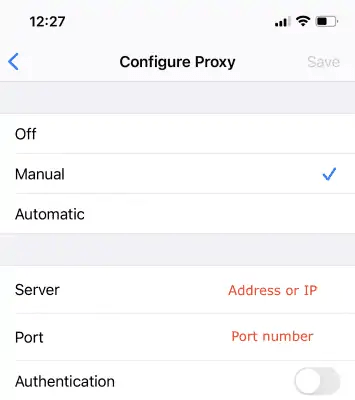
Additionally, paste the username and password values into their respective fields:
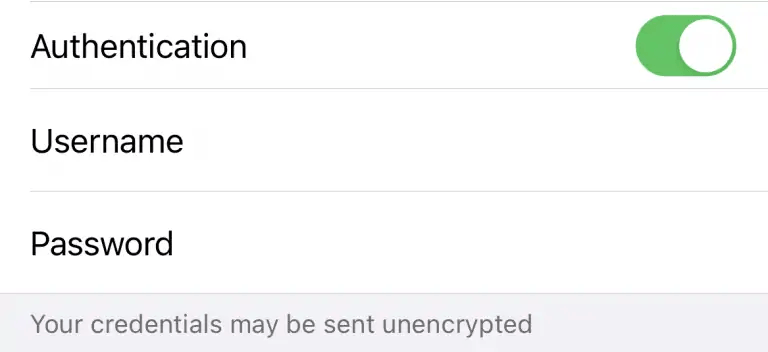
How to set up a mobile proxy on Android
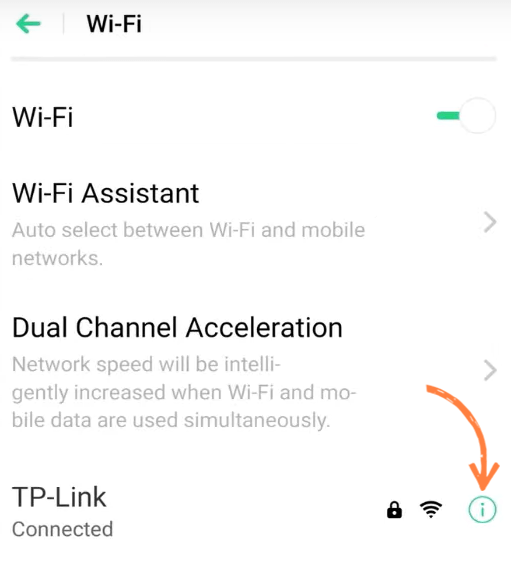
Navigating to the Wi-Fi menu, select your network, and tap this icon to open its Wi-Fi proxy settings:
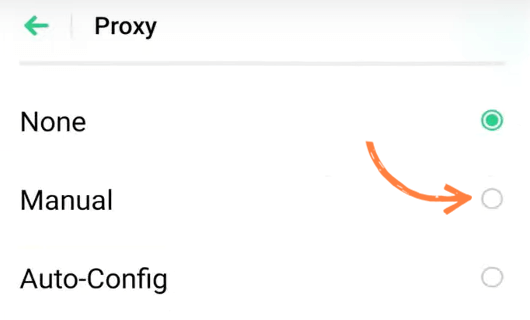
Press the Proxy field and select Manual in the configuration menu:
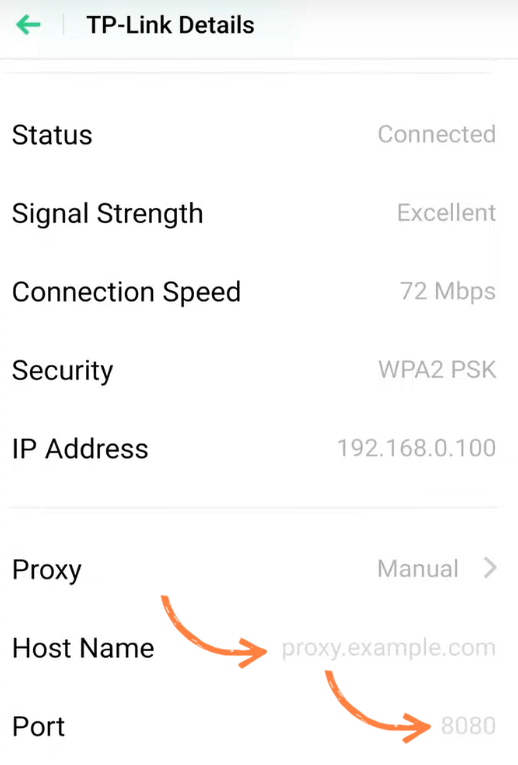
Edit these fields and add your proxy details:
How to use a mobile proxy on desktop or in a scraper
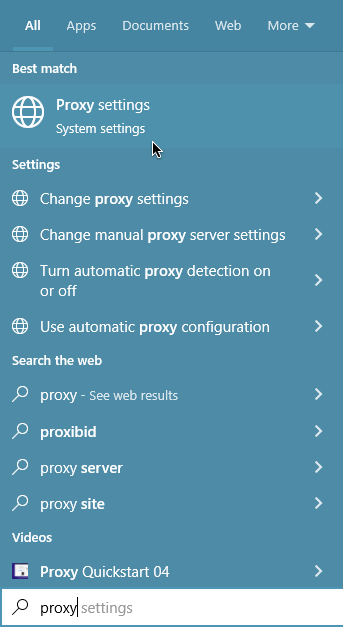
Open the Start menu and search for proxy:
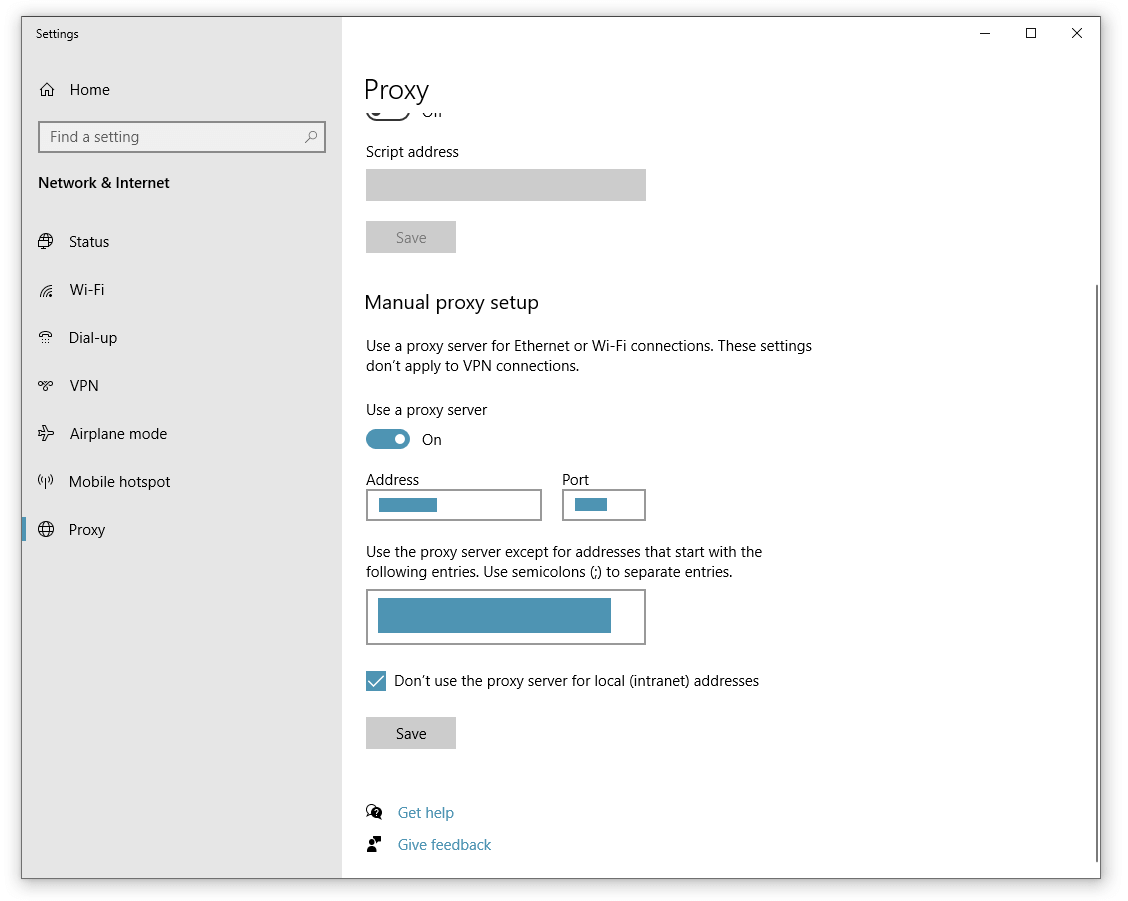
Clicking Proxy settings will open the Windows settings app. In the Manual proxy setup area below, edit the Address and Port fields using your proxy address details:
Are mobile proxies legal?
Using a mobile proxy is legal in most countries, including the US, UK, EU, and Canada. However, what matters is what you do with it.
Mobile proxies should not be used for fraud, account abuse, spam, credential theft, bypassing authentication, or accessing data you are not allowed to access. In the U.S., courts have drawn important distinctions around “authorized access” under the Computer Fraud and Abuse Act, while public-data scraping cases have also shown that terms of service and contract claims can still matter even when anti-hacking claims are limited.
Ethical sourcing is just as important as legal use. A reliable mobile proxy provider should be able to explain how its IP pool is built, whether device owners have given consent, and what controls exist to prevent abuse. This matters especially for business users that need a defensible compliance trail for procurement, security, or customer review.
If your workflow involves personal data, platform accounts, login areas, or large-scale automated collection, review the target website’s terms and applicable privacy laws before proceeding. In the EU, for example, GDPR applies to personal data processing regardless of the technology used.
This section is for general information only and is not legal advice. When in doubt, consult legal counsel before using mobile proxies in regulated, sensitive, or high-risk workflows.
Free vs. paid mobile proxies
It won’t be very hard for you to find mobile proxies offered for free. But we advise you to avoid them because they won’t help you with your needs.
It’s quite hard to create a mobile proxy network. A provider needs to acquire the devices somehow, make sure they remain within a network, and set up the system so that a gadget is used as a proxy only when it’s connected to mobile data. That’s quite a lot of work.
We at Infatica acquire mobile proxies through via our proprietary software development kit, a network of app developers that have agreed to offer their users an opportunity to become one of our peers. When a user installs an app that is a part of Infatica’s SDK, they’re offered to make their device a part of Infatica’s proxy network.
If this user agrees to this offer, they will get certain benefits — for example, free premium features or an ad-free app — and a developer receives a commission from us. Users can enter and leave our proxy network whenever they like. And while they’re our peers, we’re using their devices only when they’re idle and currently have sufficient battery power or charging. Therefore, a user will not experience any issues being our peer.
Besides the acquisition of proxies, we also manage them properly to make sure our customers always have the number of IPs they need, and the system works properly. That’s quite a lot of work as well.
As you can see, high-quality mobile proxies simply can’t be free: Chances are, providers of free proxies aren't ethical. If you encounter such a service without any charge, there is something wrong with it. Maybe most IP addresses of such a provider are already blocked. Or, perhaps, these are not really mobile proxies but some cheap datacenter ones. Either way, you simply can’t get quality service for free.
Infatica’s mobile proxies are quite affordable, and we offer several pricing plans for you to choose the number of IPs you need without paying too much. We can also create a tailored plan for you — just contact us and tell us about your needs.
How to Choose a Mobile Proxy Provider
Choosing a mobile proxy provider is not only about finding the lowest price per GB. Mobile proxies rely on real carrier-connected devices, so the quality of the network, sourcing model, rotation controls, and support can affect both performance and risk.
Check how the IPs are sourced. A reliable provider should be transparent about where its mobile IPs come from. Look for consent-based or opt-in sourcing models, clear user participation terms, and compliance processes such as customer KYC. This is especially important if you use proxies for business-critical workflows like ad verification, web data collection, or brand protection.
Review location and carrier coverage. Mobile proxy performance depends heavily on the countries, regions, and carriers available in the provider’s pool. If you need to test mobile ads in specific markets, track local SERPs, or view mobile-first platforms from different regions, make sure the provider supports the locations you actually need — not just a large headline number.
Look for flexible rotation and session controls. Some tasks need frequent IP rotation, while others need a stable session. For example, large-scale mobile data collection may benefit from rotating IPs, while account management or QA testing may require sticky sessions that keep the same IP for a set period. A good provider should let you control rotation behavior instead of forcing one default setup.
Check protocol and integration support. Mobile proxies should work with the tools your team already uses, including browsers, anti-detect browsers, scraping frameworks, QA tools, and automation scripts. Support for standard protocols such as HTTP, HTTPS, and SOCKS5 makes integration easier and avoids unnecessary custom setup.
Evaluate speed, uptime, and support. Mobile proxies are usually slower than datacenter or static ISP proxies because traffic moves through real carrier networks. Still, the provider should offer stable uptime, clear documentation, and responsive support when sessions fail, locations behave unexpectedly, or integrations need troubleshooting.
Try Infatica's mobile proxies risk-free
Frequently Asked Questions
A mobile proxy routes your traffic through a real mobile device connected to a 3G, 4G, or 5G network. The destination site sees the mobile carrier's IP address instead of yours, and because that IP is shared across many real users and rotates as devices reconnect, the traffic looks indistinguishable from genuine mobile activity.
Yes: using a mobile proxy is legal in most countries, provided the underlying IPs are sourced ethically (with user consent) and the activity itself is legal. What's restricted is what you do through the proxy: scraping data you're not allowed to access, fraud, or violating a platform's terms of service can be illegal regardless of the proxy used.
On iPhone: Settings → Wi-Fi → tap the (i) icon → Configure Proxy → Manual → enter host, port, username, password. On Android: long-press your network → Modify → Advanced → set Proxy to Manual. Native phone settings only cover Wi-Fi; cellular data needs a third-party app.
A residential proxy routes through a home broadband IP; a mobile proxy routes through a cellular carrier IP. Mobile IPs are harder to block because thousands of real users share them via CGNAT, but residential proxies are typically cheaper and offer wider geographic coverage.
Most providers price mobile proxies per gigabyte of traffic, ranging from roughly $1–$15 per GB depending on volume and pool quality. Infatica's mobile proxies start from $4/GB. Free mobile proxies exist but are not recommended.
Yes — this is one of the most common use cases. Assigning a unique mobile IP to each account (and keeping the same IP per account across sessions) helps avoid the platform pattern-detection that flags accounts logged in from the same address.
Yes, and they're often the best choice for scraping mobile-first sites, social media platforms, and any target that aggressively blocks datacenter or residential IPs. They drop into any scraping framework via standard HTTP/SOCKS5, or you can skip the integration work and use the Infatica Web Scraper API instead.